Web Design & Development
[ Web Design & Development Topics ]
General Rules
Now you need to understand some general stuff about security. First, you should know the difference between authentication and authorization, both of which are used in access control lists. Authenentication is done using a name/passcode or a digital certificate. It ensures the end user is who they say they are. Authorization on the other hand occurs after authentication and sayus whether they are authorized or denied particular information.
You should also know that there are two main levels of authentication
Note: It is advisable to keep a log of all authentication events with timestamps.
FIREWALLS
Webopedia offers an excellent description of firewalls:
"A system designed to prevent unauthorized access to or from a private network. Firewalls can be implemented in both hardware and software, or a combination of both. Firewalls are frequently used to prevent unauthorized Internet users from accessing private networks connected to the Internet, especially intranets. All messages entering or leaving the intranet pass through the firewall, which examines each message and blocks those that do not meet the specified security criteria.
There are several types of firewall techniques:
- Packet filter: Looks at each packet entering or leaving the network and accepts or rejects it based on user-defined rules. Packet filtering is fairly effective and transparent to users, but it is difficult to configure. In addition, it is susceptible to IP spoofing.
- Application gateway: Applies security mechanisms to specific applications, such as FTP and Telnet servers. This is very effective, but can impose a performance degradation.
- Circuit-level gateway: Applies security mechanisms when a TCP or UDP connection is established. Once the connection has been made, packets can flow between the hosts without further checking.
- Proxy server: Intercepts all messages entering and leaving the network. The proxy server effectively hides the true network addresses.
In practice, many firewalls use two or more of these techniques in concert.
A firewall is considered a first line of defense in protecting private information. For greater security, data can be encrypted."
PROXY SERVERS
Webopedia also offers a great description of proxy servers:
"A server that sits between a client application, such as a Web browser, and a real server. It intercepts all requests to the real server to see if it can fulfill the requests itself. If not, it forwards the request to the real server.
Proxy servers have two main purposes:Improve Performance: Proxy servers can dramatically improve performance for groups of users. This is because it saves the results of all requests for a certain amount of time. Consider the case where both user X and user Y access the World Wide Web through a proxy server. First user X requests a certain Web page, which we'll call Page 1. Sometime later, user Y requests the same page. Instead of forwarding the request to the Web server where Page 1 resides, which can be a time-consuming operation, the proxy server simply returns the Page 1 that it already fetched for user X. Since the proxy server is often on the same network as the user, this is a much faster operation. Real proxy servers support hundreds or thousands of users. The major online services such as Compuserve and America Online, for example, employ an array of proxy servers.
Filter Requests: Proxy servers can also be used to filter requests. For example, a company might use a proxy server to prevent its employees from accessing a specific set of Web sites."
For security purposes we are concerted with using a proxy server to filter requests. We can also use the proxy server to track requests and detect potential "hacks". With proxy servers you can track and filter both incoming and outgoing packet requests.
CRYPTOGRAPHY
Webopedia describes cryptography as, "the art of protecting information by transforming it (encrypting it) into an unreadable format, called cipher text. Only those who possess a secret key can decipher (or decrypt) the message into plain text. Encrypted messages can sometimes be broken by cryptanalysis, also called codebreaking, although modern cryptography techniques are virtually unbreakable."
Cryptography systems can be broadly classified into systems that use a single/private key that both the sender and recipient have, and public-key systems that use two keys, a public key known to everyone and a private key that only the recipient of messages uses.
In private key encryption, the sender and receiver both own a secret decoder/encoder algorithm. The sender encrypts using the algorithm and the receiver decrypts using the reverse.
There are several problems with this approach. For one, how do you exchange keys safely. If you are worried about the security of your communication, you can't just send the private key to the receiver over the network. If someone gets a hold of the private key, all communication can be decoded.
Unfortunately, using private key encryption, you must exchange the key in person.
Further, what happens when you exchange your key with someone who is less than dependable and some third party steals it?
Modern day encryption gets around these problems through the use of public key encryption.
Public key encryption is based on a certain type of mathematical algorithm that provides one way encryption/decryption. That is, a public key algorithm allows you to encrypt a message with a special key that has some very special properties....
Encrypted messages can only be unencrypted with a single private key.
It would be beyond the realm of probability to break the secret key through possession of the public key and encoded message.Thus, rather than distributing your private decryption and encryption keys to trusted parties and crossing your fingers, you distribute your public key to anyone who wants it with full confidence that messages sent to you that have been encrypted with your public key will only be readable by you.
Any sender can encrypt their message with your public key and that message will only be able to be unencrypted with your private key.
(Above information taken from http://www.wdvl.com/Authoring/Tools/Tutorial/public_vs_private.html)
CHOOSING YOUR SYSTEMS
When you are choosing your security systems make sure you have redundant systems (zero down time is ideal). Also consider vender support, scalability, replication capabilities, fault tolerance, and performance. Lastly all systems should be platform neutral from the viewpoint of the end user.
Usually when users log into a site there are there for the duration of a "session". You may want to add in a feature to "time-out" the session if the user does not end the session by leaving the site or logging out.
Another thing to bear in mind is that one of the larger security leaks is actually in administration of the data such as in routing and passing of the intial request, and storing of hard copies of the information.
Some technologies available:
Some competing security standards (proprietary or standards-based):
SINGLE USERNAME VERSUS SINGULAR LOGIN
As the Web and associated security grows in complexity it is becoming increasingly difficult to ensure easy access for all individuals with access to our sites. This problem is compounded as new and disparate systems are added to online environments. User-friendliness demands a single username and passcode, but this can mean two different things - a single point of entry and authentication for all systems, or a single username/passcode combination that must be entered by the user in each system. Each scheme has its own problems.
SINGLE USERNAME/PASSCODE
Some options for creating a single username/passcode:
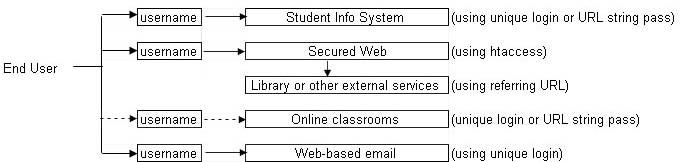
Sample of single username/passcode (re-authentication):
SINGULAR LOGIN
In an effort to make the environment(s) easier to use by the end user a single login is becoming increasingly desirable.
Some options for creating a singular login:
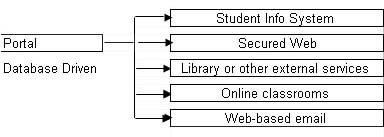
Sample of single login:
OPTIONAL: ADDITIONAL RESOURCES
Free Web Site Security Test Tools