Web Design & Development
[ Web Design & Development Topics ]
Structured Query Language (SQL) and PHPMyAdmin
It is my understanding that you have covered SQL in another course,
so I will go over this quickly as a refresher.
Here we will be using MySQL to create our databases. Ours will
be basic.
Why Use a Database
As the Web grows in complexity and user-expectation in many
cases "flat files" just don't cut it. Dynamically driven pages
with database back ends are becoming the wave of the future. Commonly the
incoming infromation is manipulated with Javascript, while the outgoing information
is manipulated using a server-side language such as PHP. And the information
itself is stored somewhere in a database, such as in MySQL. Many relational
database management systems (RDBMS) follow the 1986 ANSI approved version
of Structured Query Language (SQL).
So why are we going with MySQL? Well, the primary reasons we
are using it for this course are:
- Its free
- Its quick and powerful
- It is relatively easy to use
Common Data Types
| Type |
Size |
Description |
| varchar |
255 characters |
Can store most of the characters that appear on your keyboard. |
| char |
255 characters |
Should be used only to store characters that tend to have the same
length. |
| text |
65,000 characters |
Can store up to 65KB of text consisting of most keyboard characters. |
| int |
Whole numbers
(< 2.14 billion) |
Should be used to store whole numbers only (no decimals or spaces). |
| float |
Floating point numbers |
Consists of two parts, a whole number and a decimal number. It takes
the form float(w,d) where w is the max number of digits that the whole
number can contain and d is the max number of digits that the decimal
can contain. |
| date |
'1000-01-01' to '9999-12-31' |
A string in either 'YYYY-MM-DD' or 'YY-MM-DD' format. |
Creating a Database
First off, we need to make a database. Lets use phpMyAdmin for this, although
you can also do it via a command prompt.
Via phpMyAdmin:
1. Go to http://localhost/phpmyadmin/ after
you have started your PHP server on your local machine and you will get
a screen like this:
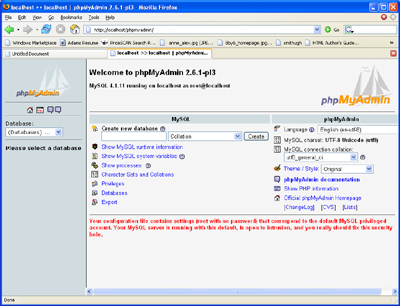
2. Where it says "create new database" type in a database name,
such as "cs453"
3. Skip down to the segment "creating a table" below
Creating a Table
Lets make a table we can work with throughout this lesson called "books" with
the following fields (note: These fields are case-sensitive so remember if
you caplitalized them or not)::
Via phpMyAdmin:
Once you created the database above it should have bought you to a window
that looks like the one below. Now we just need to name our table and tell
it how many fields there will be:
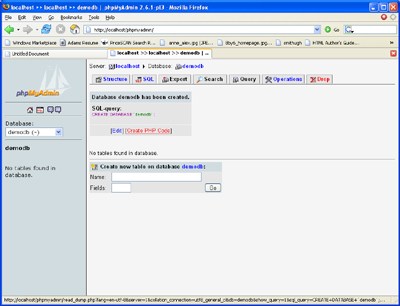
If you did not get the above window, or are re-entering your system,
then just click on the database name (in our case "cs453")
on the right and then you will see "create new table in database" in
the main screen area.
2. Now we have to tell it what the fields are (you need to put a length
in too but the rest can be left blank):
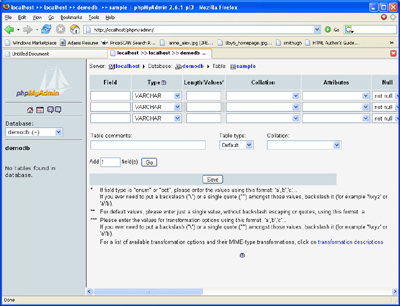
When you hit "save" you should get something like the following:
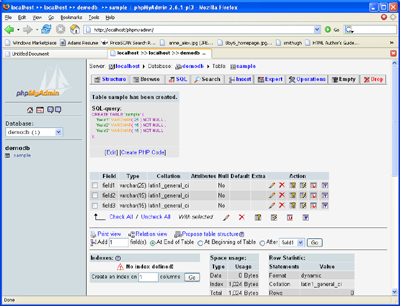
Verifying the Table Exists
Not that we have that done, lets make sure it works. Here are two useful
queries you can run to verify that the table was created. The first query
returns a list of all the tables in the database:
show tables;
The next query will show us information about a specific table:
describe books; (or whatever you named your table)
This query describes to us information about the table's field names, data
types and constraints.
Inserting Data into Tables
Via phpMyAdmin:
Now that we have verified the existence of the table we created we can
safely add data to it. To do this we click on "insert" in myphpadmin:
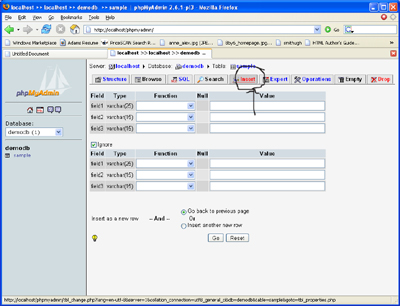
and then we just fill in our data. Lets add the following books:
- The Little Prince by Antoine de Saint-Exupery in Hardcover
- The Power of Now by Eckhart Tolle in Softcover
- Electronic Commerce by Gary P. Schneider in Softcover
or via command prompt:
insert into books (title,author,edition)
values
('The Little Prince','Antoine de Saint-Exupery','Hardcover');
Lets say you wanted to add more than one, you could do it like this:
insert into books (title,author,edition)
values
('The Little Prince','Antoine de Saint-Exupery','Hardcover'),
('The Power of Now', 'Eckhart Tolle','Softcover'),
('Electronic Commerce', 'Gary P. Schneider', 'Softcover');
Searching for Records
Ok, we have created our database and a table. We have added our records.
Great. But how do I select certain records? Thats the primary relevance of
databases after all, to be able to extract data we want....
Via phpMyAdmin:
Click the tab that says "Search" and put in your search criteria,
such as all Softcover books:
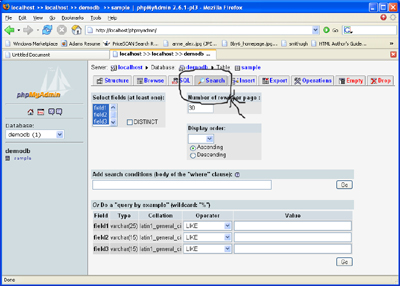
Here is another way to do it, click the tab that says "SQL" and
type in the line:
SELECT * FROM `books` WHERE Edition like 'softcover'
Then hit "go"
Updating Records
Great. I can select stuff now. But what if I have data I want to change?
Via phpMyAdmin
phpMyAdmin makes it very easy on us. We just hit the tab "Browse" and
then hit "edit" on the line we want to change:
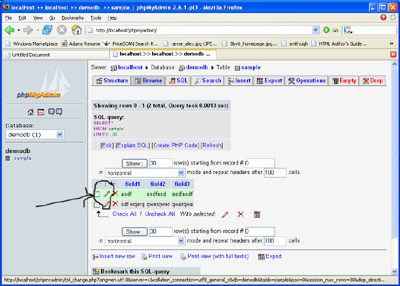
Deleting Records
Via phpMyAdmin
Again phpMyAdmin makes it easy on us. We just have to click the "browse" tab
and then choose "delete" (the "x") on the record in question
Altering Tables
Via phpMyAdmin
Just go to the "structure" tab and make your changes there
Removing entire tables
This uses the "drop" command. I won't demo this in phpmyadmin
as I don't want you to do it. However, you just hit the 'drop' tab and it
will confirm deletion.